Thanks for signing up! We'll be in touch. Please don't forget to check your junk mail/spam/promotions folder if you don't receive an email from us within 30 minutes.
Your subscription have been submitted.
It appears this email address is already subscribed.
An error occurred in your subscription. The subscription may be disabled.
TSA Locks are required for all customers travelling to the USA. The TSA (Transport Security Administration)
screens every passenger’s baggage before it’s placed on the plane. At their discretion, from time to time,
they choose to open a passenger’s luggage for closer inspection. When this occurs, if the luggage is fitted
with any lock other than those approved by the TSA, they will destroy whatever lock is fitted to gain access.
Luggage locks approved by the TSA have a universal master key that will open the locks. This key does not come
with your suitcase, nor can it be purchased separately for you to use. Only the TSA have a copy of this master
key. Every TSA approved lock has an identifying mark that shows it may be opened by the master key. All
Samsonite TSA Locks feature the TSA’s red diamond logo.
How do I set/reset my lock?
To set/reset your combination, compare the lock on your suitcase to those pictured below. Please note that
your lock may vary, so follow the steps of the instructions for the lock that has the same functions as your
suitcase’s lock only.
All locks are preset to 0-0-0 by default at the factory. Your combination can be set/reset as often as you
need. However, you can only reset the combination if you know the currently set combination. If you’ve
forgotten your combination, you will need assistance from a Samsonite Authorised Repair Centre to unlock your
suitcase.
To locate your nearest Repair Centre, please click
here.
When your Samsonite suitcase arrives, your combination is preset to 0-0-0. To unlock your suitcase, slide the
TSA Lock to release the zippers. To set your combination, follow these steps:
Press the Reset Button using a pen or pencil.
Set the 3-Dials to your desired combination (ex: 111).
Set the combination by sliding the TSA Lock.
Place the zippers into the Zipper Housing.
To test your new combination:
Mix up the combination and try sliding the TSA Lock.
Your new combination is now set. To unlock your suitcase, turn the 3-Dials back to your chosen combination
(ex. 111), then slide the TSA Lock to release the zippers.
To reset your combination, set the 3-Dials to your current combination and follow the steps above.
Cable Combination Lock
Your padlock combination is preset to 0-0-0. To unlock your padlock, press the Unlock Button to release the
Cable from the lock housing.
To set/reset your combination, follow these steps:
Press the Reset Button using a pen or pencil.
While pressing the Reset Button, set the 3-Dials to your desired combination (ex: 1-1-1)..
Release the Reset Button.
Insert the Cable back into the lock housing.
To test your new combination:
Mix up the combination and try pressing the Unlock Button.
Your new combination is now set. To unlock your padlock, turn the 3-Dials back to your chosen combination
(ex. 1-1-1), then press the Unlock Button to release the Cable from the lock housing again.
To reset your combination, set the 3-Dials to your current combination and follow the steps above.
Please remember your new combination.
Lite-Box ALU Latch Lock
When your Samsonite suitcase arrives, your combination is preset to 0-0-0. To unlock your suitcase, slide both
Lock Sliders simultaneously to release the latches.
To set/reset your combination, follow these steps:
Open your suitcase and locate the A/B Switch on the interior side of the lock.
Set the A/B Switch to position B.
Set the 3-Dials to your desired combination (ex: 111).
Set the A/B Switch back to position A.
Slide both Lock Sliders simultaneously to set your new combination.
To test your new combination:
Mix up the combination and try sliding the Lock Sliders.
Turn the 3-Dials back to your chosen combination (ex. 111), then slide both Lock Sliders simultaneously to
release the latches.
To reset your combination, set the 3-Dials to your current combination and follow the steps above.
IBON Front-Opening Lock
When your Samsonite suitcase arrives, your combination is preset to 0-0-0. To unlock your suitcase, turn the
Rotating Lock Dial counter-clockwise until it opens.
To set/reset your combination, follow these steps:
Locate the SET/OFF Switch on the right-hand side of the Rotating Lock Dial.
Set the SET/OFF Switch to the SET position using a pen or pencil.
Set the 3-Dials to your desired combination (ex: 111).
Set the SET/OFF Switch back to the OFF position.
To test your new combination:
Close your suitcase, mix up the combination and try turning the Rotating Lock Dial.
Turn the 3-Dials back to your chosen combination (ex. 111), then turn the Rotating Lock Dial
counter-clockwise until it opens.
To reset your combination, set the 3-Dials to your current combination and follow the steps above.
3-Point Latch Lock (55cm size)
When your Samsonite suitcase arrives, your combination is preset to 0-0-0. To unlock your suitcase,
press/slide the Unlock Button/Slider and release the latches at the top and bottom of your suitcase.
To set/reset your combination, follow these steps:
Unlock your suitcase, the lock will pop-out when unlocked.
Press the Reset Button using a pen or pencil.
Set the 3-Dials to your desired combination (ex: 111).
Set the combination by pressing the lock back into place.
To test your new combination:
Mix up the combination and try pressing/sliding the Unlock Button.
Your new combination is now set. To unlock your suitcase, turn the 3-Dials back to your chosen combination
(ex. 111), press/slide the Unlock Button/Slider and release the latches at the top and bottom of your
suitcase.
To reset your combination, set the 3-Dials to your current combination and follow the steps above.
3-Point Latch Lock (M and L sizes)
When your Samsonite suitcase arrives, your combination is preset to 0-0-0. To unlock your suitcase, lift the
Lock Housing and release the latches at the top and bottom of your suitcase.
To set/reset your combination, follow these steps:
Lift the Lock Housing to unlock and reveal the red tab underneath.
Pull the red tab down to put it into the SET position.
Set the 3-Dials to your desired combination (ex: 111).
Lift the red tab back up into the OFF position.
Set the combination by pressing the Lock Housing back into place.
To test your new combination:
Mix up the combination and try lifting the Lock Housing.
Your new combination is now set. To unlock your suitcase, turn the 3-Dials back to your chosen combination
(ex. 111), lift the Lock Housing and release the latches at the top and bottom of your suitcase.
To reset your combination, set the 3-Dials to your current combination and follow the steps above.
BEAMIX Smart Combination Lock
When your Samsonite suitcase arrives, your combination is preset to 0-0-0. To unlock your suitcase, slide the
TSA Lock to release the zippers.
To set/reset your combination, follow these steps:
Press the Reset Button using a pen or pencil.
Set the 3-Dials to your desired combination (ex: 111).
Set the combination by sliding the TSA Lock.
Place the zippers into the Zipper Housing.
To test your new combination:
Mix up the combination and try pressing/sliding the Unlock Button.
Your new combination is now set. To unlock your suitcase, turn the 3-Dials back to your chosen combination
(ex. 111), press/slide the Unlock Button/Slider and release the latches at the top and bottom of your
suitcase.
To reset your combination, set the 3-Dials to your current combination and follow the steps above.
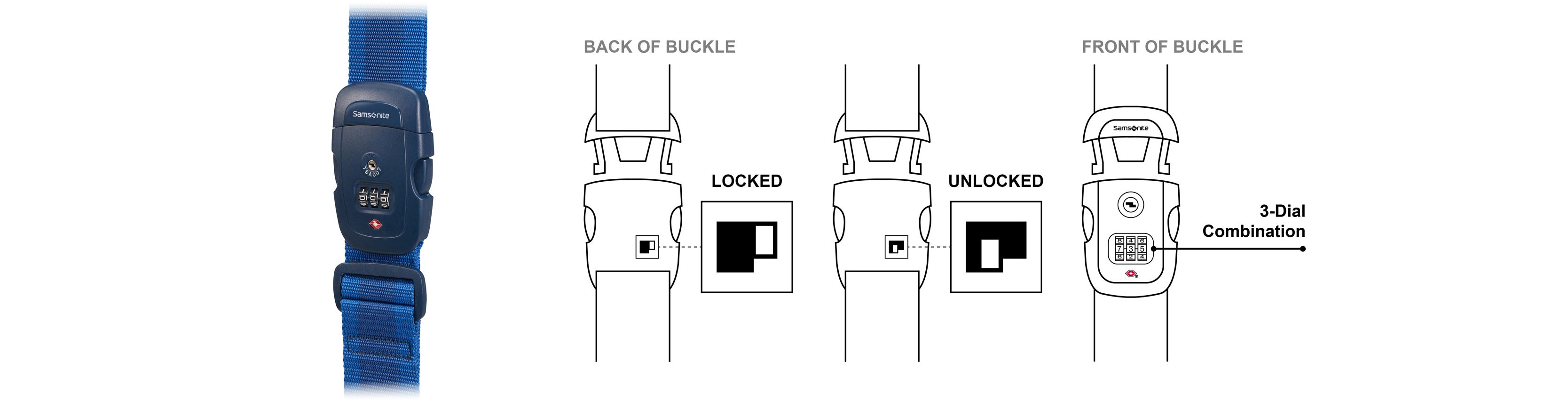
TSA Luggage Strap Instructions (Classic)
When your Samsonite luggage strap arrives, your combination is preset to 0-0-0. To open your strap, press
the sides of snap lock buckle to release the clip.
To set your combination, follow these steps:
With the luggage strap closed, move the “switch” on the back of the buckle to the unlocked position
Set the 3-Dials to your desired combination (ex: 111).
Set the new combination by moving the “switch” to the locked position.
To test your new combination:
Mix up the combination and try to open your strap by pressing the sides of the snap lock buckle to again
release the clip.
Your new combination is now set. To open your luggage strap, turn the 3-Dials back to your chosen
combination (ex. 111), then press the snap lock buckle on the luggage strap to release the clip.
To reset your combination, set the 3-Dials to your current combination and follow the steps above.
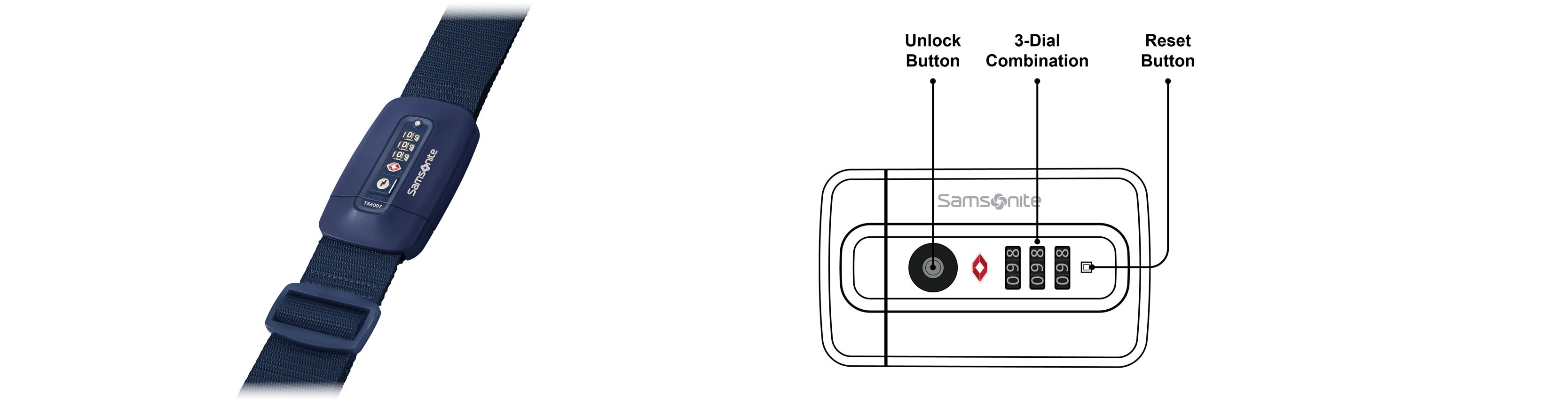
TSA Luggage Strap Instructions (New)
When your Samsonite luggage strap arrives, your combination is preset to 0-0-0. To open your strap, press
the unlock button to release the clip.
To set your combination, follow these steps:
With the luggage strap closed, press the Reset Button using a pen or pencil.
Set the 3-Dials to your desired combination (ex: 111).
Set the combination by pressing the lock button.
To test your new combination:
Mix up the combination and press the lock button to ensure the lock is locked.
Your new combination is now set. To unlock your luggage strap, turn the 3-Dials back to your chosen
combination (ex. 111), then press the lock on the TSA luggage strap to release the clip.
To reset your combination, set the 3-Dials to your current combination and follow the steps above.